

Most website owners focus on productive activities. These activities include producing new content, creating new pages, and generating new keywords. However, something that most web owners do not give much thought to is what goes between the pages, and this area is where most ranking potential goes untapped. Internal links are the web glue of a website, and poor internal linking leads to isolated pages that should actually be collaborating.
It is the invisibility of the internal link that makes it easy to overlook. Unlike a new page or backlink, which produces instant results, internal links create an invisible effect. This invisible effect will accumulate slowly but eventually create a powerful influence.
Why Internal Links Matter More Than Most People Think
Links lead crawlers to pages. While links to your page come from external sites, once a crawler lands on your website, internal links show it the way to all other pages. In the absence of internal links, some pages are not crawled at all, and those pages that get crawled are seen as much less important than they are.
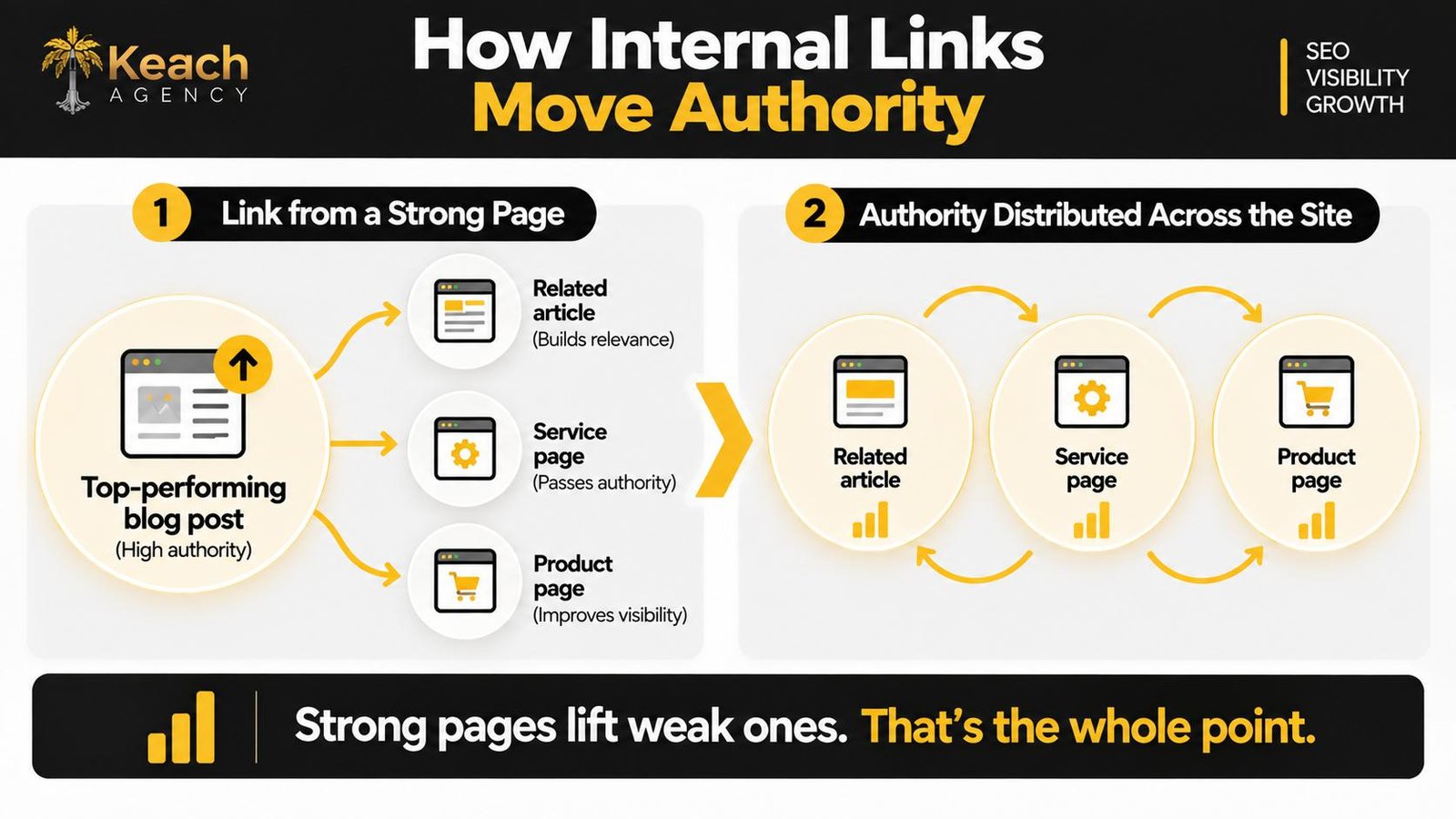
But there is one more feature that is more obvious. Links transfer authority between pages; therefore, a good page can boost an average one just by adding a link. That’s why it’s no wonder that homepages and high-ranking blog posts become the pages with the most internal links, as they are usually gateways and authorities.
And then there’s the visiting end. If a user is looking for a specific subject, chances are they’ll stick around longer if there is a clear next step to follow, which is where internal links within the text work better than sidebars. And while on-page time and bounce rate are relevant for how search engines rank the site, they are even more so for whether the site stays memorable in the user’s mind. Creating that sort of linked experience begins well before writing, which is why it helps to be familiar with title tag optimization for SEO so you can write links from pages clearly.
The Basics of a Healthy Internal Link Structure
An effective internal link strategy is based on determining the purpose of each page and creating links that help achieve this purpose. Linking randomly does not benefit anyone. Relevant pages linked from other relevant pages through anchor text make the target clear for both users and search engine bots.
All the important pages have to be just a few clicks away from the homepage. The closer, the better. A page that needs six clicks from where most users begin their navigation will be considered insignificant by the crawlers and almost never reached by the users. This can easily be fixed by linking to it from several places without any need for any technical changes.
Internal linking also requires consideration of existing pages that work well and using them as an aid for driving other pages forward. Blog posts that generate regular traffic can be used as an asset for pushing a service page that could use some boost in authority. One link will be more effective than a dozen links on a page that never receives any traffic.
Structure becomes important in this context too, since understanding H1 vs. H2 vs. H3- how headings affect SEO will help position links strategically rather than placing them anywhere on a page without any structure.
Internal Linking: How Authority Flows Across Your Site
Where Most Sites Go Wrong
The problems tend to repeat across sites of every size, and each one leaves ranking potential on the table without producing any visible error.
- Links only in navigation menus, never in the body of the content.
- Anchor text that says “click here” or “read more” with no descriptive value.
- Orphan pages that no other page links to.
- The same anchor text pointing to different pages across the site.
- Every blog post linking to the homepage but nothing else.
- No links between related pages that clearly support each other.
The orphan page problem is the most damaging, because a page that nothing links to is essentially invisible to crawlers unless it’s in the sitemap and gets discovered that way. Even then, it’s treated as low priority. Checking which pages have no internal links pointing to them is usually the first step in fixing internal link SEO, and it often reveals pages the owner had forgotten existed.
There’s a subtler version of the same problem, which is pages that get traffic but never convert because the next step isn’t obvious. A reader lands on a page, finishes it, and has nowhere to go. That’s where how to write meta descriptions that get clicks connects to the work of internal linking, since the same logic applies to both. What you promise on the outside has to match what you deliver on the inside, and both have to point the reader toward something better than bouncing.
How to Build Links That Actually Help
Building internal links that work comes down to a few habits that are worth making part of your routine rather than treated as a project.
The first is linking while you write. When you mention a topic you’ve already covered elsewhere on the site, link to it. That’s when the connection is clearest, and the anchor text writes itself. Going back to add links later is fine, but it’s easier when it happens in the moment.
The second is using descriptive anchor text. “Learn more about our fulfillment services” lets the reader and search engine know where the link leads. “Click here” tells them nothing. It’s also important to use different anchor texts for linking to the same pages, because repeating the same phrase while linking many times to the same page starts to be unnatural.
The third is picking the pages that require more support. It’s useful to link from other pages to a page that has zero backlinks and is not ranking anywhere. On the other hand, pages that already rank well don’t need extra authority so badly, but linking to them from relevant content will be helpful.
Here comes the benefit of having someone to manage the whole on-page SEO services, as it’s much more efficient to work on internal linking throughout the entire website, rather than doing page-by-page SEO on the fly. The pages that require linking may differ from the pages that one writes about.
Connecting Links to Everything Else on the Page
Internal links should not be seen in isolation from other page components. Every element on the page influences the effectiveness of the links and how well they perform their function.
There is no way to underestimate the value of images. Learning how to optimize images for SEO will give you another chance to use internal links, as images’ alt text will describe what is in the picture and sometimes lead to an appropriate page. This is another step, though a minor one, that contributes to overall optimization of a site that regularly publishes content.
Although meta descriptions have nothing to do with internal links directly, they influence the way pages are presented in search results and consequently the amount of traffic they get. Traffic is the main criterion to determine whether a page is an internal link resource or not.
One may say that internal links appear at the last stage of the whole process. It means that titles, headers, descriptions, and images should define the meaning of a page. Then, links provide a road map that leads from one page to another.
When to Rethink Your Linking Structure
But there is a stage when the structural issues become more significant than the gradual linking of individual webpages. In such a case, a website that has been developed and expanded for several years without the planned link-building approach usually contains webpages that have to be linked, but aren’t, and gaps that cannot be overcome until the structure is fixed, even with additional linking.
The most evident evidence of the need to restructure a website is when you cannot understand which pages support other pages. If the question is answered incorrectly or cannot be answered by anyone in your company, your website works intuitively and not strategically, and its rankings prove it. External professional analysis of the internal links and the structure of a website usually brings better results than linking pages without any structure.
Such analysis helps to discover many opportunities you haven’t considered before. Webpages that complement each other but do not contain any links. Parts of your website that got separated with the development of your business. Old content that could support new pages if the links were in place. None of it requires new content to fix, which makes internal linking one of the cheapest improvements available to almost any site.
Conclusion: The Work Between the Pages
Internal linking rarely gets the attention that content and backlinks do, but it shapes how everything else on your site performs. Pages that link to each other work harder than pages that don’t, and crawlers reward structure even when visitors never see it.
Keach Digital Agency treats internal linking as part of a larger on-page system rather than an isolated task. Whether you need a full audit or help figuring out which pages should be pointing at which, the goal stays the same. A site that’s easy to navigate, easy to crawl, and structured so every page has a clear role.
Ready to Make Every Page Work Harder?
Keach Digital Agency maps internal links across your site.
FAQs
How many internal links should be placed on each page?
There isn’t a specific answer to this question; it just needs a few related links per page to be effective for most of the web pages out there.
Do internal links have an impact on rankings?
Indirectly, yes. As internal links help to find new pages, distribute their authority across the website, and impact user flow, these elements play a role in the ranking process.
What should the best anchor text for internal linking be?
Text that is descriptive and gives both the visitor and the search engine a clue of what the linked page is all about. The more variety you can have in phrasing the links, the better.
Can there be too many internal links on a page?
Yes, there definitely can be. Especially when they are all grouped together in the sidebar or the footer without providing any context at all. Links within the body copy that actually help the visitor navigate to the linked page are always useful, and links just grouped in the sidebar – never are.
How can I find orphan pages?
Perform a comparison of your sitemap and the crawl of your site to find pages that lack any internal linking from other parts of your website. Those pages that are present in the sitemap and nowhere else will be completely orphaned.