
The heading tags are among the SEO factors that every marketer and writer is aware of, but few take time to consider their importance properly. The heading is always there when you create content; the visual aspect is fine, and the content is published without any thought as to the underlying structure. And the traffic comes to a halt; no one knows why, and the heading structure is seldom the first factor under consideration.
This is unfortunate because there is more to headings than just breaking up the text. The headings reveal to the search engine what your webpage is all about, how the sections are structured, and where the essential data is located. In other words, a webpage with the wrong heading structure undermines its own performance.
Why Heading Structure Matters
Search engines don’t read pages the way people do. They parse the underlying code, and headings are one of the strongest signals available for understanding what a page covers. An H1 tells them the main topic. Subheadings reveal the supporting topics and how they fit under the main one. Skip that structure and the algorithm has to guess, which is never a good position to be in.
Headings influence user experience as well. A page without any subheadings is just a wall of text and will be much more difficult to read. Users on mobile devices in particular depend on headings to make a decision whether the information they see is valuable enough for further reading.
There’s a third function that gets overlooked. Headings create an outline, and that outline becomes the foundation for featured snippets, AI-generated summaries, and other formats that pull structured information from pages. A clear heading structure makes it easier for those systems to extract the right answer, which is increasingly where visibility is won.
Not Sure Your Headings Are Working the Way They Should?
Keach Digital Agency reviews the structure across your whole site.
The Difference Between H1, H2, and H3
The hierarchy starts from H1, then H2, H3, H4, H5, and H6, with each subsequent heading denoting the level of depth relative to the previous. Most of the time, most websites will only require H1, H2, and H3 headings, and hence the H1 vs H2 vs H3 comparison touches on most of the relevant things.
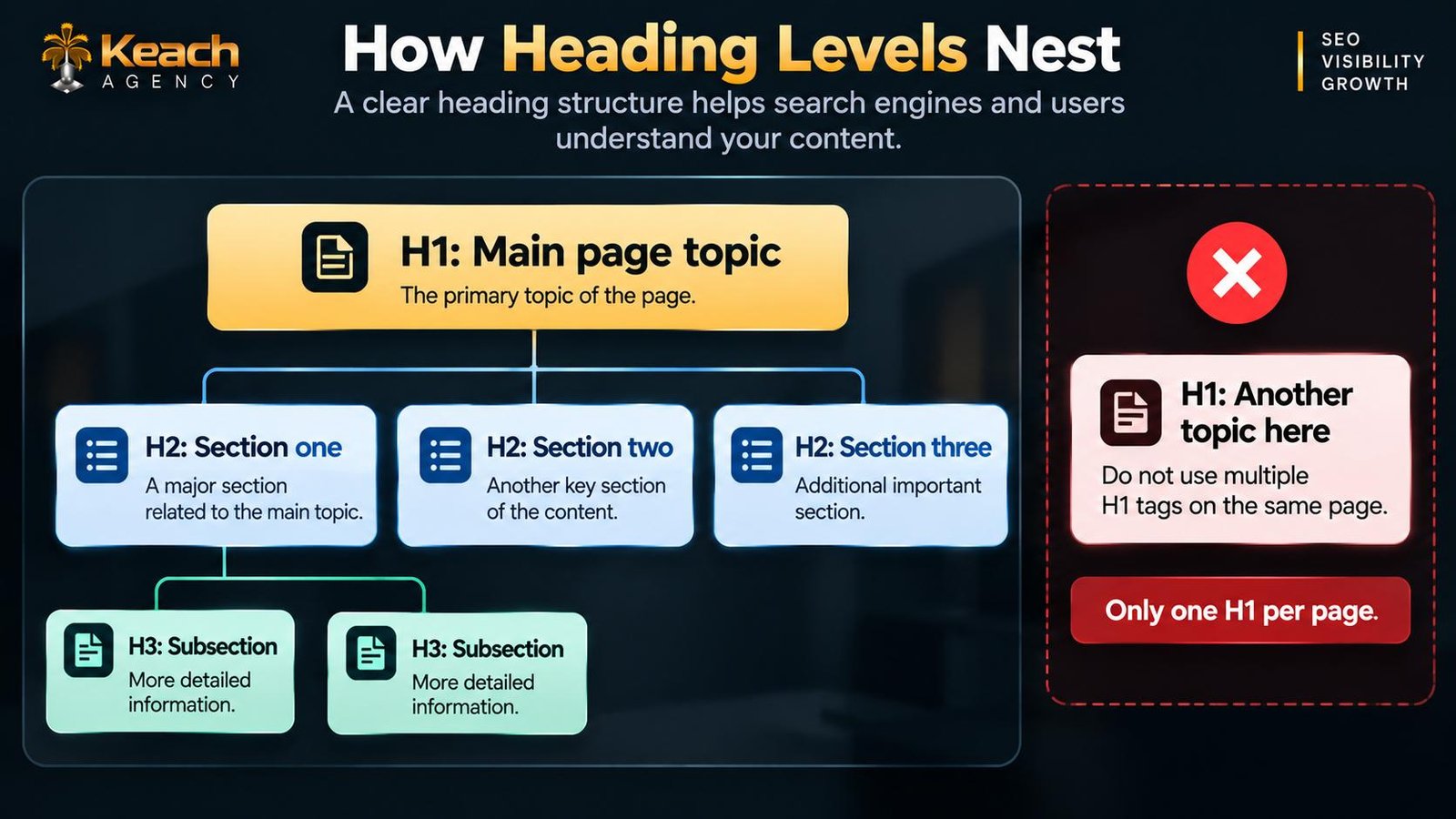
The H1 heading represents the page title, and ideally, there should only be one on a page. The H1 heading should give an overview of what the page is all about based on the search intent. More than one H1 heading confuses the hierarchy and makes it difficult for search engines to understand the main topic of discussion.
The H2 headings separate different parts of a page. They are distinct ideas related to the H1 heading. In essence, the page can be read like a table of contents.
H3 headings go a level deeper. They break H2 sections into smaller pieces, which is useful when a section covers several related points. Using H3s sparingly keeps the structure clean, while overusing them turns the outline into a maze.
H1, H2 & H3: Building a Clear Page Structure
How H1, H2, H3 Affect SEO
The issue of how heading tags affect rankings always comes up, and the truth is that there are numerous indirect ways through which heading tags affect SEO.
The use of headings is important because it helps the search engine understand the content of the pages being crawled. This also impacts the indexing of the pages and how well they match particular searches. The click-through rate is impacted by the use of headings in the search results or in featured snippets. User experience and accessibility are improved by the use of headings. This is important because screen readers use headings to navigate pages.
When using On-Page SEO services that specialize in heading tags, pages are likely to rank well for particular keywords. However, this happens not because of the impact that headings have on rankings but because the rest of the page becomes clear to the search engines and the users.
SEO Heading Structure That Holds Up
Creating a solid heading hierarchy involves a set of rules that remain relevant even as algorithms change.
An H1 tag for the whole page, naming the general subject. H2 tags for large sections, with each of them introducing a separate concept. H3 tags for subsections, only if the information below the header requires it. No jumping between the levels; an H3 should never be placed without a preceding H2. And no decorative headings, such as those that are placed simply because of design, not structure.
H1, H2, H3 SEO is also about keyword placement in a natural manner. It is quite normal to use keywords in your headings, as it is quite natural to do so, but you should not put them there just for the sake of keywords, especially when it looks unnatural.
Common Heading Mistakes That Quietly Hurt Pages
A handful of problems show up across sites of every size, and each one reduces the page’s ability to rank without producing any obvious error.
- Multiple H1s on a single page, which splits the main topic.
- Headings used for visual styling rather than structure.
- Skipped levels, like an H3 appearing without an H2 above it.
- Vague headings such as “Introduction” or “Conclusion”.
- Keyword stuffing in headings that reads unnaturally.
- Templates that apply the same heading structure to every page.
The template issue is worth its own mention, because it’s the hardest to catch. A site built from a page builder might use H2 tags for sidebar widgets or H4 tags for call-to-action buttons, which means every page carries structural noise that wasn’t intentional. Fixing this once at the template level corrects the problem everywhere, which is exactly the kind of work that justifies bringing in on-page SEO services rather than trying to patch pages individually.
Where Headings Sit in the Broader Page Structure
Headings don’t work in isolation. They interact with every other element on the page, and understanding how they fit together makes the whole system easier to manage.
The title tag and the H1 should complement each other rather than repeat the same words. Understanding how to optimize title tags for SEO helps clarify what the H1 should add rather than duplicate, since the two elements serve different purposes even when they cover similar ground. The title earns the click in search results, and the H1 confirms the reader landed where they expected.
Meta descriptions follow a similar logic, sitting outside the page itself but influencing whether anyone arrives at it in the first place. Knowing how to write SEO meta descriptions that get clicks rounds out the picture, because headings, titles, and descriptions all work together to shape how a page appears in search and how it gets treated once someone visits.
Conclusion: Structure Supports Everything Else
Headings aren’t the most exciting part of SEO, and they rarely produce dramatic ranking changes on their own. What they do is make everything else work better. Content gets understood faster, pages get scanned more easily, and search engines have a clearer picture of what each page offers.
Keach Digital Agency treats heading structure as part of a larger on-page system rather than an isolated fix. Whether you need a full site review or help correcting years of accumulated template issues, the goal stays the same. Pages that read clearly, rank well, and give both readers and search engines what they’re looking for.
Ready to Fix the Structure Holding Your Pages Back?
Keach Digital Agency reviews headings across your entire site.
FAQs
How many H1 tags does a page need?
A page should have one H1 tag. Having more than one splits the main idea and makes it difficult for search engines to understand what the page is about. However, there are some cases when multiple H1s may be used.
Can I apply headings only for styling purposes?
Yes, you can. But it’s not recommended to do that because headings help search engines and screen readers understand the structure of the page. Therefore, it is much better to use CSS for styling purposes.
Do headings need to contain keywords?
It depends on whether the relevant terms will sound natural. If you try to stuff them with irrelevant terms, it may look like poor-quality content.
What is the result if heading levels are skipped?
It will break the logical structure of the page. Although it is not critical, it is better not to skip any levels. So, if you have an H1 tag, then go straight to H2 and then H3.
Do heading tags affect featured snippets?
They can. Search engines often pull featured snippets from content that sits under a clear heading, since the heading helps them identify what question the section answers. Clean structure makes those extractions more likely.