

Every website has a conversation with search engines. The robots.txt file is how you set the ground rules. It tells crawlers where they can go and where they cannot. Get it right, and search engines respect your wishes. Get it wrong, and you might accidentally hide your entire site from Google.
Most site owners ignore this file. They assume it works by default. Sometimes it does. But when something goes wrong, the consequences are severe. Pages disappear from search results. Traffic drops. Panic sets in.
What a Robots.txt File Actually Does
The robots.txt file lives at the root of your website. Its address is always the same. Yourdomain.com/robots.txt.
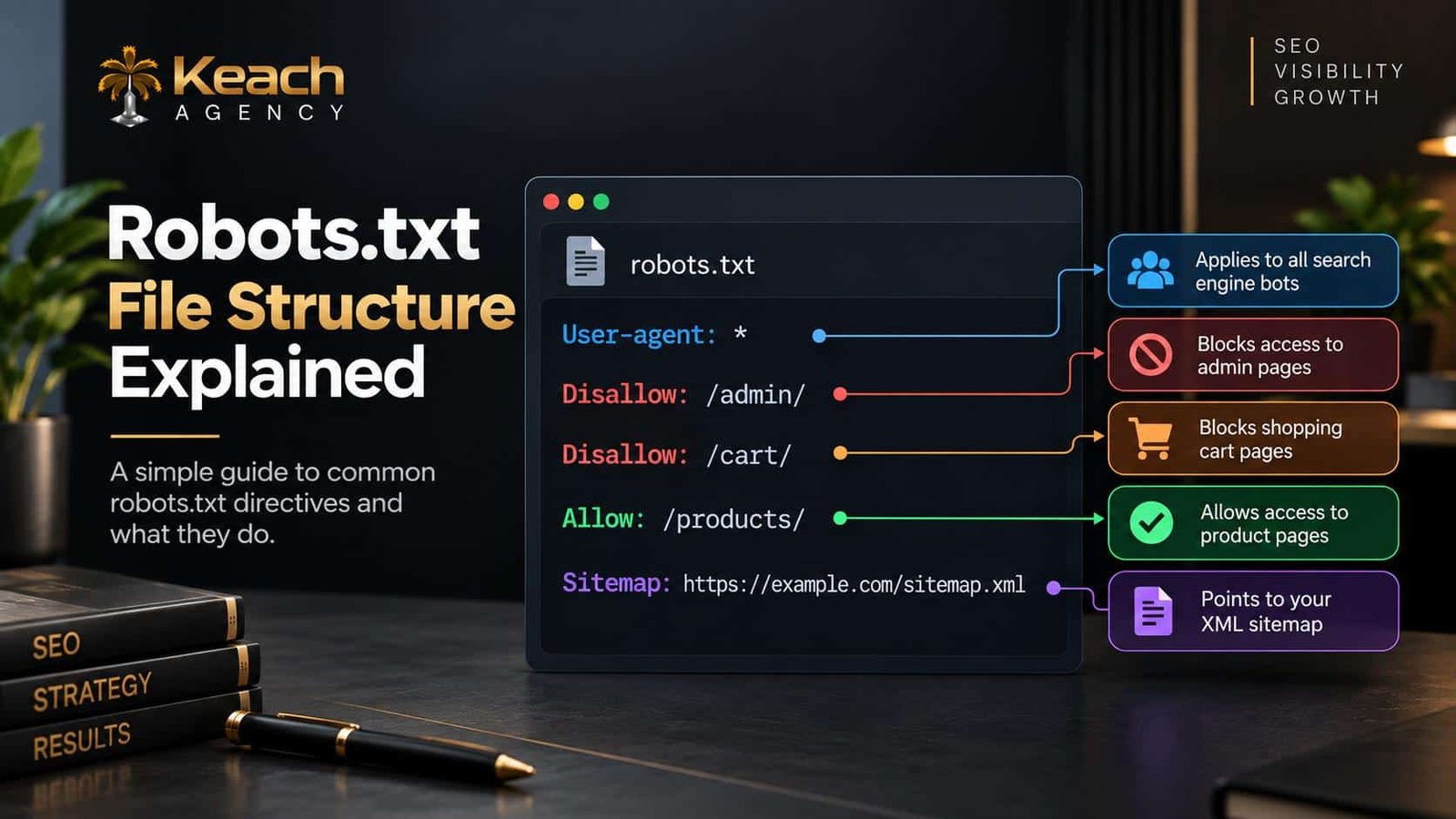
As soon as the search engine crawler lands on your website, it reads the robots.txt file first. This file has some commands that instruct the bot regarding which pages to crawl and which not to.
The robots.txt file doesn’t compel you to obey it. If you are running an ethical search engine, you’ll adhere to the guidelines. If you have a malicious bot, then you wouldn’t.
The file uses a basic syntax where user-agent lines define which bot’s rules are concerned. Disallow lines define which paths not to crawl, while allow lines define exceptions.
Worried About Blocking the Wrong Pages?
A robots.txt mistake can hide your site from Google.
Why Robots.txt SEO Matters
Robots.txt SEO affects how search engines interact with your site. A well-configured file helps crawl budget. It prevents bots from wasting time on admin pages, login screens, and duplicate content.
A poorly configured file does the opposite. It blocks important pages. It prevents indexing. It creates confusion that takes weeks to resolve.
The stakes are high. A single misplaced character can block an entire section of your site. Testing before deployment is not optional.
Robots.txt Optimization Basics
Setting up robots.txt correctly is not complicated. But it requires attention to detail.
Identify What to Block
Admin panels. Shopping cart pages. Internal search results. Duplicate category pages. These waste crawl budget and should be excluded.
Identify What to Allow
Product pages. Blog posts. Category pages. Anything you want indexed must remain accessible.
Use Specific User-Agents
You can block all bots or specific ones. Blocking Googlebot entirely is almost never a good idea.
Test Before Deploying
Use Google Search Console’s robots.txt tester. It shows exactly how Google interprets your file. Fix errors before they go live.
Here is a visual breakdown of robots.txt structure:
Common Robots.txt Errors
Several mistakes appear again and again. Avoiding them prevents most problems.
Blocking the Entire Site
The line “Disallow: /” blocks everything. This is sometimes intentional during site maintenance. Forgetting to remove it after launch is catastrophic.
Blocking CSS and JavaScript
Google needs to see how your site renders. Blocking these files prevents proper rendering. Pages may not index correctly.
Conflicting with Noindex Tags
If a page is blocked in robots.txt, Google cannot see the noindex tag. The page might still appear in search results based on other signals. This is not the desired outcome.
Forgetting the Sitemap Line
Adding your sitemap location helps Google find your content. It is a small addition with big benefits.
Robots.txt Errors and How to Fix Them
Search Console reports robots.txt errors clearly. Common issues include syntax errors, unreachable files, and overly broad blocks.
A syntax error means Google cannot read the file. It might ignore it entirely. Check for typos. Ensure proper line breaks.
An unreachable file returns a 404 error. Google then assumes no restrictions apply. This is usually fine but not ideal for control.
Overly broad blocks prevent important pages from being crawled. Review your disallow rules carefully. Remove anything that blocks content you want indexed.
How Robots.txt Relates to Sitemaps
Your robots.txt file should point to your sitemap. This guide explains XML sitemap optimization and how sitemaps help Google discover content.
The robots.txt file controls crawling. The sitemap guides discovery. Together, they shape how Google navigates your site.
Make sure they do not conflict. If a page is in your sitemap, it should not be blocked in robots.txt.
Robots.txt and Site Speed
Crawling requires resources. When bots crawl pages at a slow rate, there is going to be a delay when loading pages. This tutorial is about Core Web Vitals and how speed can affect SEO.
Excluding useless pages through the use of robots.txt decreases the workload of the server.
When to Hire a Technical SEO Service
Small sites can manage robots.txt with basic knowledge. Larger sites face more complexity. A technical SEO service brings expertise that prevents costly mistakes.
They review your configuration. They test changes before deployment. They monitor Search Console for errors. This oversight protects your site from accidental blocks.
If your site has thousands of pages or complex architecture, professional help is worth the investment.
Testing Your Robots.txt File
Never deploy changes without testing. Google Search Console provides a robots.txt tester. Enter a URL. See if it is blocked or allowed.
Also check your live file. Visit yourdomain.com/robots.txt in a browser. Read the rules. Look for anything unexpected.
Test after every change. Small edits can have large consequences.
Best Practices for Robots.txt
Follow these guidelines to avoid problems.
- Block admin pages and internal search results.
- Allow CSS and JavaScript files.
- Point to your XML sitemap.
- Test before deploying changes.
- Review periodically for outdated rules.
- Never block your entire site accidentally.
These habits keep your site accessible to search engines while protecting crawl budget.
Conclusion
The robots.txt file is small but mighty. It controls how search engines crawl your site. Done right, it improves efficiency and protects resources. Done wrong, it hides your content from the world. Keach Agency helps businesses configure robots.txt correctly. We review files, identify errors, and ensure your site stays visible. Do not let a simple text file sabotage your SEO. Get it right the first time.
Ready to Take Control of Your Crawl?
Robots.txt is powerful. Use it wisely.
FAQs
What is a robots.txt file?
A robots.txt file is a file that is present at the root of your website and provides information to the search bot regarding which URLs should be crawled and which URLs shouldn’t be crawled. Search engine bots always see this file first when visiting your website.
How is robots.txt beneficial for SEO?
The robots.txt file controls the crawl budget and makes sure that unnecessary pages do not get indexed. If there are no errors in the robots.txt file, then the search engines will consider only the important content.
How to create a robots.txt file?
Create a text file named “robots.txt”. Add user-agent commands and disallow directives. Include sitemap directive. Host it in the root directory of your website. Test its effectiveness via Google Search Console.
What will happen if I incorrectly block some pages?
These pages will not be crawled or indexed. They will not appear in search engine results. The traffic to my website will decrease. It would take time and effort to fix my mistake.
When should I use the services of a technical SEO for robots.txt?
Use professional services if your website is complicated and consists of many pages.