

There’s a strange thing that happens to sites as they grow. You publish content for years, each piece targeting its own topic, and everything looks organized on the surface. Then you check Search Console and notice something odd. Two pages from your own site are showing up for the same query. Sometimes three. And neither one is ranking as well as it should.
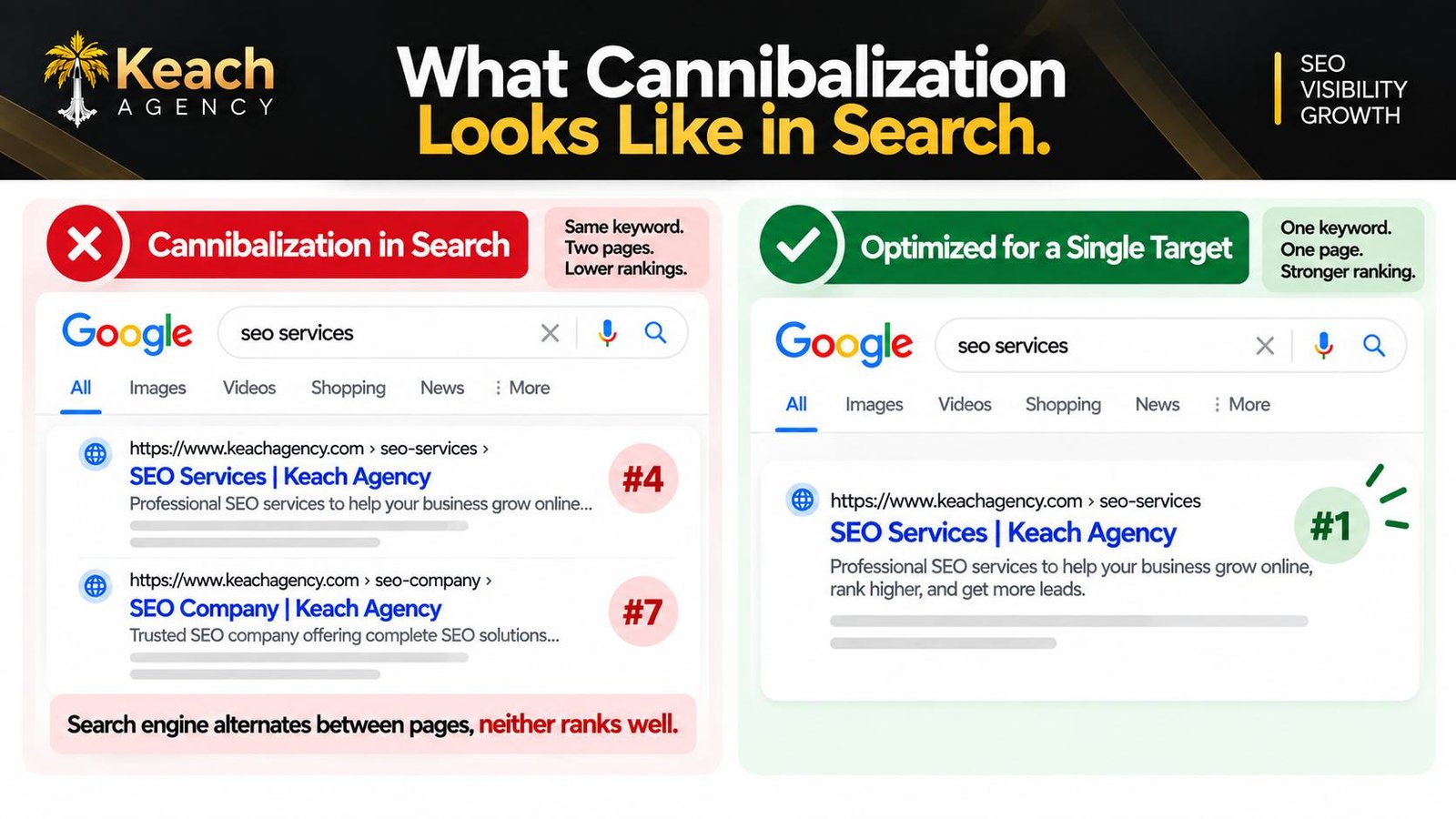
That’s keyword cannibalization, and it’s one of the few SEO problems that gets worse the more content you publish. The pages aren’t competing with a competitor. They’re competing with each other, and search engines can’t decide which one deserves the top spot. So they split the authority, alternate between the two, and both underperform.
What Keyword Cannibalization Looks Like
The name makes it sound dramatic. It’s really just a situation where more than one page on your site is targeting the same search term, and search engines end up treating them as interchangeable rather than complementary.
Some cannibalization is obvious. You wrote a blog post called “How to Improve Email Open Rates” last year, then wrote another one called “Email Open Rate Tips” six months later, and now both are competing for the same keyword. Easy to spot once you know to look for it.
Other cases are sneakier. A product page and a blog post both targeting the same phrase. A service page and a location page fighting over the same city-based keyword. A homepage and a category page that have drifted into overlapping territory over time. The content looks different, but the intent behind each page is close enough that search engines see them as substitutes.
On-page SEO services that handle site audits run into this constantly, usually on sites that have been publishing for two or more years. It’s rarely intentional. It just happens when content grows without a plan.
Why It Happens to Almost Every Growing Site
Cannibalization isn’t a sign of bad SEO. It’s a sign of content that grew organically without anyone tracking the full picture. That’s normal. Most businesses publish based on what feels useful at the time, not based on a master keyword map that’s kept up to date.
A few patterns make it more likely. Writing the same topic twice because you forgot the first post existed. Letting a category page and a blog post drift into the same keyword territory. Building a location page for a service you already cover on a main service page. Expanding a short post into a longer one without deleting or redirecting the original.
The examples add up quickly, which is why keyword cannibalization examples usually look different from site to site. The underlying issue is the same, though. Two pages trying to answer the same question, and search engines are left to figure out which one they should show.
Two Pages Fighting for the Same Keyword?
Keach Digital Agency identifies cannibalization across your site.
Signs Your Pages Are Competing With Each Other
Not every cannibalization problem announces itself. Some show up in obvious ways; others hide behind metrics that look fine on the surface.
A few things worth checking.
- Two URLs from your site showing for the same query in Search Console.
- Rankings that bounce between two pages without either one holding steady.
- Impressions climbing on a page while clicks stay flat.
- A blog post outranking a product or service page for a keyword you want the product to own.
- Declining rankings on a page that used to perform well before you published something similar.
That last one is the classic pattern. Everything looks fine until you publish “one more post” on a topic you’ve already covered, and then both pages start underperforming. The new content didn’t fail. It just split the authority the original page had built.
SEO Cannibalization: When Two Pages Compete for One Keyword
How to Fix Keyword Cannibalization
As far as solving the problems of keyword cannibalization goes, it boils down to choosing the right pages for each keyword and doing everything necessary to make them win.
Sometimes the solution will be to consolidate the two pages into a single one and then use redirection for one of them. This solution would work best when the two pages in question are too alike to compete, and none of them has the potential to be useful on its own terms.
In some cases, you’ll need to differentiate the two pages; in other words, to rewrite one of them so that it addresses a related but distinct keyword. When your pages address two different topics and have somehow become too alike, this solution may be the most effective one.
Sometimes you’ll need just to redirect one of the pages to the other one because one of them is too weak, old, and redundant.
In order to find the best solution to the problem of keyword cannibalization, you will need to choose an appropriate one depending on the situation. That is what requires judgment, and that is what makes on-page SEO services faster at solving this problem.
Preventing Cannibalization Going Forward
Fixing the current problems is only half the work. Preventing keyword cannibalization from happening again requires a bit more structure than most sites currently have.
Before writing anything new, check whether you’ve already covered the topic. That sounds obvious, but it’s the step most people skip. A quick site search for the main keyword usually reveals whether an existing page could just be updated instead of replaced.
Keep a keyword map. Nothing elaborate. A simple spreadsheet that lists each important page and the primary keyword it targets. When two pages end up with the same keyword, you’ll see it immediately rather than months later.
And be honest about which pages deserve to rank. If a product page should own a keyword but a blog post keeps outperforming it, that’s a signal worth acting on. Sometimes the fix is linking from the blog post to the product page with clear anchor text, which shifts authority toward the page you actually want ranking.
When to Bring in Help
A handful of competing pages on a small site is manageable. A site with hundreds of URLs that have accumulated over years is a different situation. At that scale, finding every instance of cannibalization manually becomes a project in itself, and the interactions between pages get complicated fast.
That’s when an experienced on-page SEO services team earns its place, because the work isn’t just finding the problems. It’s deciding which pages should survive, which should be merged, and how to redirect without losing rankings along the way. Get it right and the whole site performs better. Get it wrong, and you can accidentally delete pages that were quietly supporting other content.
Conclusion: One Keyword, One Page
Cannibalization isn’t a dramatic problem, but it’s a persistent one. Two pages competing for the same keyword means neither one gets the full benefit of the content behind it, and the effect compounds across an entire site.
Keach Digital Agency audits cannibalization as part of a broader on-page strategy, mapping which pages compete and deciding how to fix it without losing rankings along the way. Whether you’re dealing with a few overlapping posts or years of accumulated content, the on-page SEO services here are built around making every page earn its place. One keyword, one page, one clear winner.
Ready to Stop Your Pages From Competing?
Keach Digital Agency finds cannibalization and fixes it properly.
FAQs
How can I know if my website has keyword cannibalization?
Check Search Console to see more than one URL coming from your website ranking for a specific query. Sort your web pages according to their intended keyword and see which ones are conflicting. A keyword map will make the task easier if you already have one.
Is keyword cannibalization always negative?
Not always. A little cannibalization among related web pages is normal, but it becomes a problem if the two web pages compete because they have the same intent and aren’t ranking as they should.
Do I need to remove the weaker page?
No, you don’t. By removing the page, you lose its SEO authority. Instead, merge the web page content into the dominant page.
Could I simply apply a canonical tag to address this problem?
Not always, although sometimes it is effective. Canonical tags are useful if two pages are exact duplicates; otherwise, if they are different perspectives on the same topic, then applying canonical tags will confuse the search engine about what to index.
How often do I need to test my site for cannibalization?
Once or twice a year is sufficient for most websites; if a website generates a lot of content, the number of tests could be increased. It is also helpful to perform one-time testing after each large-scale content generation effort.