

Load up almost any modern site and something odd happens. The page appears, then shifts, then fills in. Prices slide into place, reviews appear, sometimes the entire product grid only shows up a beat after you’ve landed. It looks fast to a person. To a search engine, that same page can look like an empty frame with nothing inside it.
Nobody notices this problem at first. Traffic is fine. Rankings hold steady. Then a template changes, or a new section launches, and suddenly a batch of URLs that used to pull steady clicks stops appearing for anything.
That’s the thing about JavaScript and SEO. The failures rarely announce themselves. They just quietly remove pages from the equation.
Why JavaScript Became SEO’s Biggest Blind Spot
Older sites were boring in a useful way. The server sent complete HTML, and whatever arrived was what crawlers read. No waiting, no second pass, no ambiguity. JavaScript broke that arrangement. Now the first response often contains almost nothing, and the content depends on scripts running afterward.
Google can handle this. Its crawler renders pages, and it’s gotten good at it. But rendering costs computing power, and anything that costs resources gets scheduled rather than done instantly. That scheduling is where the problems begin.
Other engines are less patient. Bing renders JavaScript but with narrower limits. Plenty of scrapers, social preview bots, and AI tools read raw HTML and nothing else. Build your content to appear only after execution, and a real portion of the internet will never see it.
Not Sure If Google Sees Your Pages?
Keach Digital Agency audits JavaScript sites and finds what crawlers miss.
How Search Engines Actually Process JavaScript
The sequence unfolds in stages, and every stage is a place where things go sideways.
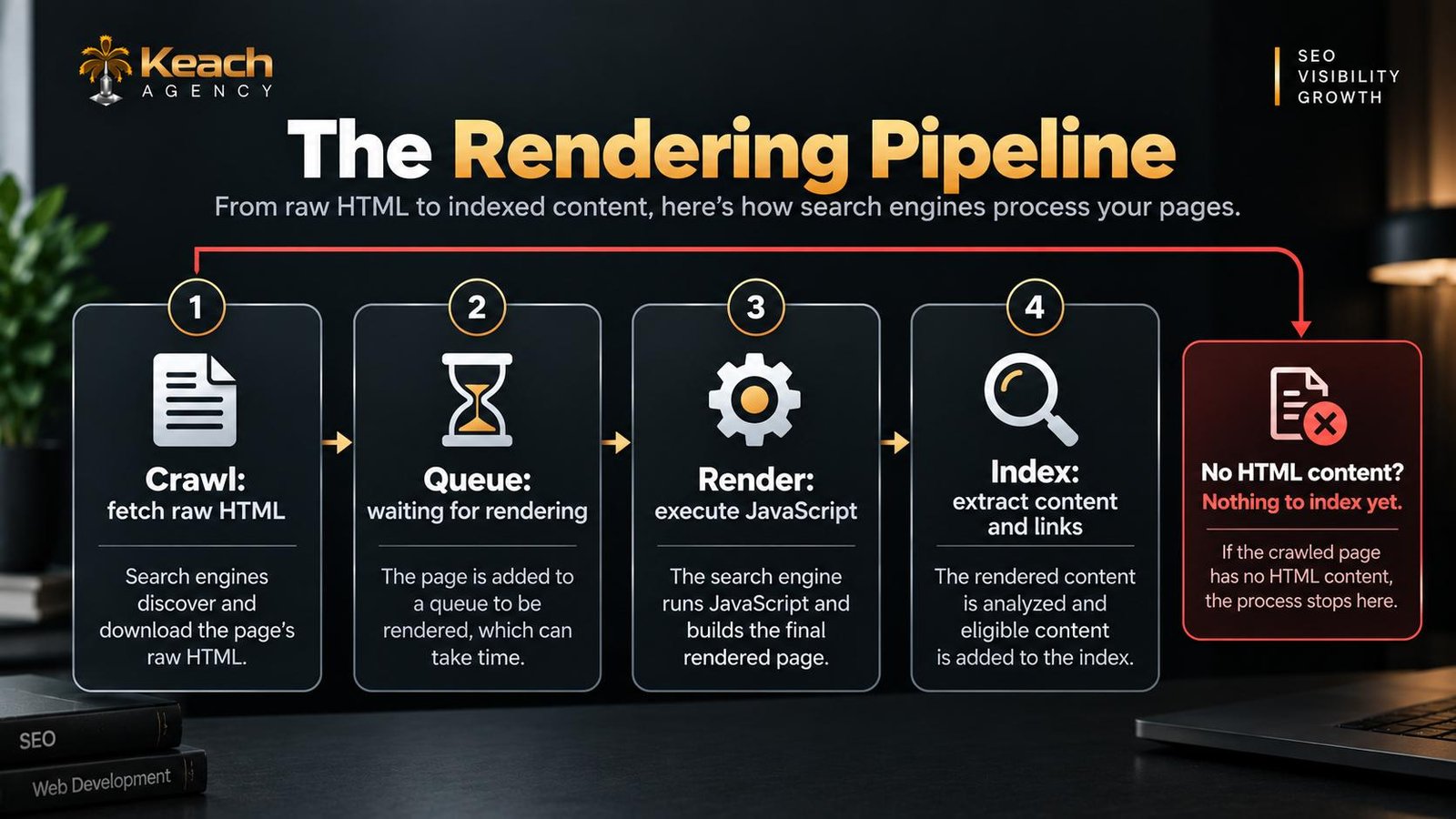
A crawler fetches the URL and gets the initial HTML. If the content is sitting right there, indexing happens quickly. If it isn’t, the page gets parked in a rendering queue. Eventually a headless browser runs the scripts and produces the finished DOM, and only then does Google pull the text, links, and structured data out of it.
The queue is the part that catches people off guard. Rendering is delayed work, so indexing is delayed work. On a site with a few thousand pages, that delay can stretch from a day into several weeks. Content that updates constantly, like pricing or stock levels, may never be captured in its current form at all.
How Search Engines Render and Index Your Website
Where JavaScript Crawling Breaks Down
Most problems aren’t architectural. They’re small calls that seemed sensible at the time.
Lazy loading is the usual suspect. Deferring images and content until someone scrolls is excellent for load speed and genuinely bad for crawlers, which don’t scroll the way a person does. Infinite scroll causes a related mess. If new items only appear as you travel down the page, there may be no paginated URLs for anything to link to.
Buttons that navigate through event listeners instead of proper anchor tags are another quiet killer. A visitor sees something clickable. A crawler sees a div with no href and moves on. Those pages end up reachable by humans and invisible to bots.
Timing causes its own set of failures. Scripts that fire late, or only after interaction, may not run during rendering at all. The rendered page looks complete in a screenshot but is missing the parts that matter most.
The first thing worth checking is boring and effective. View the raw HTML source and search for your main content. If it isn’t there, that’s your starting point, and it’s a finding that shows up in nearly every technical SEO services audit of a JavaScript-heavy site.
Rendering Strategies and What They Cost You
Three main approaches exist, and each one asks you to give something up.
Client-side rendering hands all the work to the browser. It’s simple to build and cheap to host. It’s also the weakest setup for search visibility, because indexing depends entirely on the rendering step going well.
Server-side rendering builds the full HTML on each request. Crawlers get everything on the first fetch, which eliminates the indexing delay. The cost shows up as server load and infrastructure complexity, especially under heavy traffic.
Static and incremental rendering pre-build pages at deploy time or on a schedule. For most content-heavy sites, this is the practical middle ground. Crawlers receive complete HTML immediately, and hosting stays affordable. Frameworks like Next.js and Nuxt let you pick per route rather than committing the whole site to one method, which matters because a blog post and a live inventory page have very different needs.
The Details That Quietly Decide Indexing
Some issues never surface in a standard crawl report but shape results anyway.
Canonical tags injected by JavaScript are a good example. If the tag only exists after rendering, Google may process it late or skip it, and duplicate content problems creep in. Meta robots directives added client-side carry the same risk, with higher stakes since they can accidentally block pages.
Structured data shares the vulnerability. Product schema added after load may be ignored or delayed, and since rich results drive a large share of e-commerce clicks, that’s an expensive gap to leave open.
Redirects belong in this conversation too. When they’re handled in JavaScript rather than through HTTP headers, crawlers get confused and often pass no signals.
Testing What Crawlers Actually See
Guessing wastes time. Look at what’s being delivered instead.
The URL Inspection tool in Google Search Console shows the rendered HTML and flags resources that failed to load, which is usually the fastest way to catch blocked scripts or third-party dependencies crawlers can’t reach. The Rich Results Test renders pages too, so it’s a quick check on whether structured data survives execution.
Server logs add another layer. They reveal how often Googlebot requests your JavaScript files and whether crawl budget is being spent on things that don’t matter. It’s tedious work, but it answers questions nothing else can.
There’s also a free trick worth trying. Turn JavaScript off in your browser and reload the page. Whatever’s left is roughly what a non-rendering crawler sees. If it looks broken or blank, you’ve found your problem in about ten seconds.
Conclusion: Serve the Content First
Every fix traces back to one idea. Deliver the content, then let JavaScript improve the experience. Sites built on that principle hold up no matter how search engines change, because they don’t depend on a rendering step happening correctly.
Keach Digital Agency works with teams whose sites have outgrown the assumptions they were built on. Sometimes the answer is rethinking how pages render. Sometimes it’s a short list of small issues quietly capping an entire section. Either way, the objective doesn’t change. Pages crawlers can read, and people actually want to use.
Is JavaScript Hiding Your Best Content?
Let’s find out what search engines really see on your site.
FAQs
Can Google index JavaScript content?
Yes, Google can render and index it, but rendering happens in a second stage after the initial crawl. That delay slows indexing, and it creates real problems when scripts fail, load slowly, or require user interaction before they run.
Is client-side rendering SEO toxic?
No, but this is the riskiest approach. If your content appears as a result of JavaScript execution, then you rely on the rendering phase during crawling. Server-side or static rendering makes you independent of the crawling phase, which is more reliable for indexing.
How can I understand whether Google renders my pages properly?
URL Inspection is an excellent tool in Google Search Console. It shows the rendered HTML code of the page, lists resources that may be blocked by the crawler, and helps compare raw response with the end result. The difference between these two usually highlights the problem right away.
Should I redesign my website because of JavaScript SEO?
Almost never. Issues related to indexing are caused not by the entire website structure, but often by the routes, links or tags that were added by JavaScript.