

Most websites look simple on the surface. Pages load. Text appears. Images sit where they should. But behind that calm exterior is a system quietly organizing everything. That system is content management.
At its core, content management is about control. It’s how businesses create, store, update, and publish content without breaking their website every time something changes. Whether it’s a blog update, a new service page, or a small text edit, content management keeps things running smoothly.
This is where a content management system becomes essential. Not optional. Essential.
Before systems like these existed, even a basic website update meant touching code. One mistake could take a page offline. Today, a website content management system removes that friction and gives teams room to work without fear.
Struggling to keep website updates consistent?
Keach Agency helps manage, organize, and maintain your content without the stress.
Understanding Content Management Without the Technical Noise
Content management isn’t about tools alone. It’s about process.
Every piece of content on a site goes through stages. It gets created. It’s reviewed. It’s published. Eventually, it’s updated or removed. A strong content management approach makes sure none of those steps feel chaotic.
A content management system acts as the control center. It stores content in a structured way so teams can find, edit, and reuse it without digging through folders or code files.
Most modern CMS platforms separate content from design. That means you can update words or images without touching layout files. This separation is what makes content management scalable.
As websites grow, content piles up. Blog posts. Landing pages. Product updates. Without a system, things break quietly. Pages go outdated. Messaging drifts. SEO suffers.
That’s why a website content management system matters more as a business grows, not less.
How a Content Management System Works Behind the Scenes
A content management system usually has two core parts working together.
- The first is the content interface. This is where users write, edit, and manage content. It’s designed for humans, not developers. You log in, open a page, make changes, and save.
- The second is the delivery layer. This is what turns stored content into visible pages. It pulls the right information and displays it using templates and themes.
Together, these layers allow teams to focus on content management without worrying about how pages are technically assembled.
Most CMS platforms also handle permissions. Writers can write. Editors can approve. Admins can publish. That structure prevents mistakes while keeping workflows moving.
A CMS for website management isn’t just a tool. It’s a gatekeeper that keeps content organized and accountable.
Why Content Management Matters More Than Ever
Websites aren’t static anymore. Content changes weekly, sometimes daily. New offers. Updated services. Fresh blogs.
Without proper content management, even good content loses value. Outdated pages confuse users. Inconsistent messaging hurts trust. A well-maintained content management system helps businesses stay current without burning time on manual fixes. Updates become routine, not risky.
Search engines notice this, too. Fresh, well-structured content signals reliability. A website content management system supports SEO by making updates easier and faster.
Content management isn’t about speed alone. It’s about sustainability. Can your site keep up with your growth without becoming messy? A good CMS answers that question quietly in the background.
CMS Types and Choosing the Right Fit
Not all content management systems work the same way.
Some are simple and template-based. Others are flexible and modular. The right choice depends on how much control a business needs.
Here’s a quick comparison to clarify the differences:
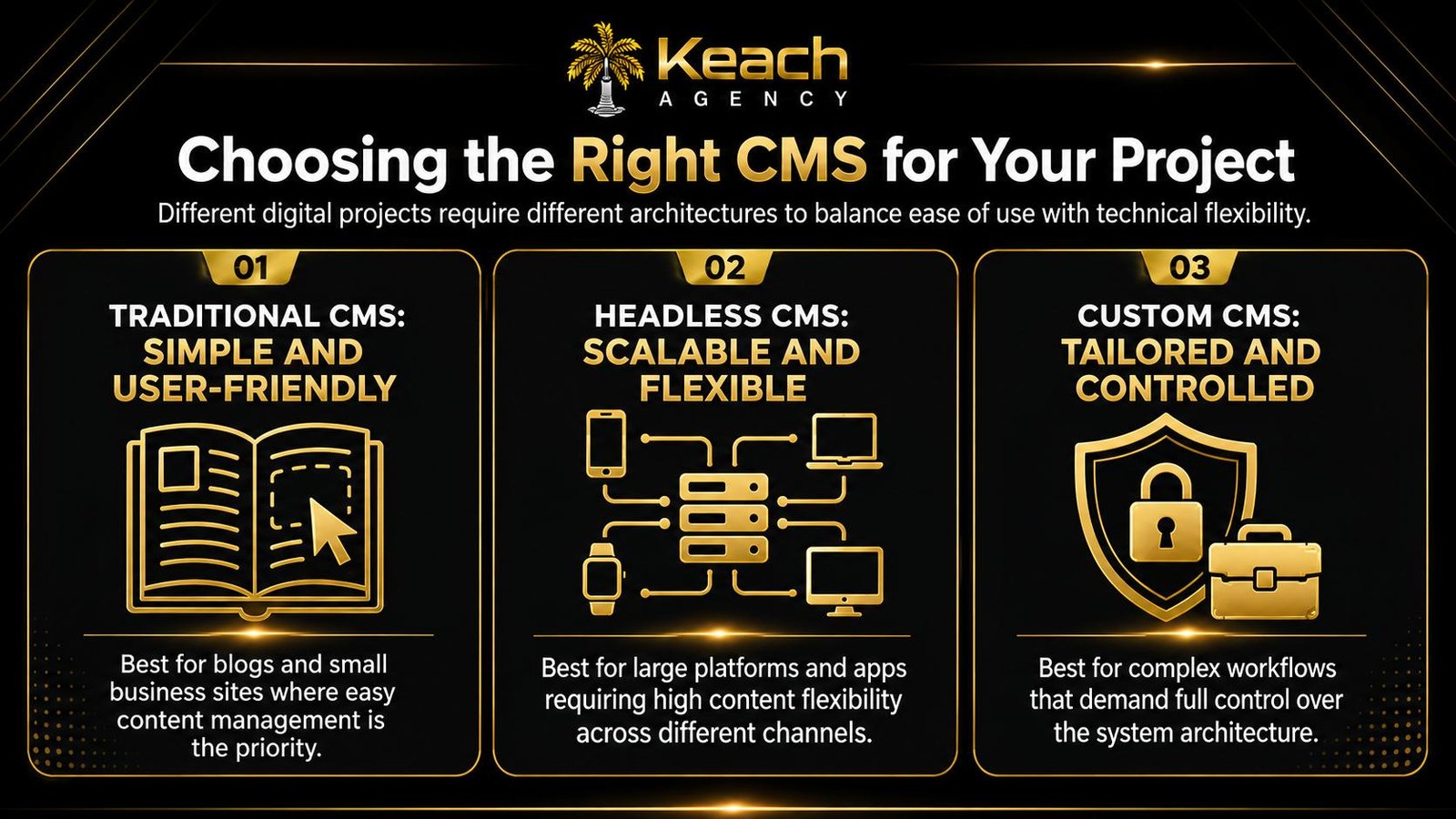
Regardless of type, the goal stays the same. Clear content management that doesn’t slow teams down.
Choosing a CMS for website management should focus on usability first. If a system feels confusing, it won’t be used properly. And unused systems quietly fail.
Updating content keeps getting delayed?
A content management system only works when someone owns it.
Content Management and Team Collaboration
One overlooked benefit of content management is collaboration. When multiple people touch a website, things can get messy fast. Overwritten content. Lost drafts. Conflicting updates.
A content management system prevents that by tracking changes and assigning roles. Everyone knows what they’re responsible for. For growing teams, this matters. Marketing writes. Editor’s review. Leadership approves. The CMS keeps a record of it all.
A website content management system also makes handovers easier. When someone leaves or joins, content doesn’t disappear with them. It stays structured and accessible. This stability is why businesses lean on content management long-term. It removes dependency on individuals and builds systems instead.
Common Content Management Mistakes to Avoid
Even with the right tools, content management can fail if misused.
Some common issues include:
- Publishing without a content structure.
- Letting outdated pages pile up.
- Ignoring permissions and approvals.
- Treating the CMS as a storage box, not a system.
A CMS for website management needs ongoing care. Content audits. Regular updates. Clear ownership. Without that, systems become cluttered. And clutter leads to confusion, both for users and search engines.
Good content management feels invisible when it’s done right. Visitors never notice it. They just experience clarity.
The Role of Support in Content Management
Tools don’t manage content on their own. People do. Many businesses install a content management system and assume the problem is solved. It isn’t. The system needs attention.
This is where dedicated support makes a difference. Someone who understands the CMS, the content flow, and the goals behind each page.
A website content management system becomes far more effective when someone consistently monitors updates, fixes formatting issues, and keeps pages aligned with strategy. That support doesn’t have to be internal. What matters is reliability.
Final Thoughts
Content management doesn’t draw attention to itself. That’s the point. When done well, it creates stability. Content stays organized. Updates happen without panic. Teams know where things live and how to change them.
A content management system isn’t about control for control’s sake. It’s about removing friction so content can evolve naturally as a business grows. Whether you’re running a simple site or a complex platform, a CMS for website management gives structure to ideas. And structure is what turns content into something sustainable. If you want any content marketing help, feel free to contact us.
When content stops being a headache, it starts doing what it’s meant to do. Support growth quietly, consistently, and without drama.
Is your CMS set up but underused?
Keach Agency keeps your CMS organized, updated, and working quietly in the background.
FAQs
What is content management in simple terms?
Content management is the process of creating, organizing, updating, and maintaining website content. It ensures that information stays accurate, accessible, and easy to manage over time.
What does a content management system actually do?
A content management system allows users to edit and publish website content without coding. It stores content securely and displays it through templates, making updates faster and safer.
Why do businesses need a website content management system?
A website content management system helps businesses keep content current, reduce errors, and maintain consistency. It supports growth by making updates easier as websites expand.
Is a CMS only for large websites?
No. A CMS for website management benefits small and large sites alike. Even simple websites need structured content management to avoid outdated pages and broken messaging.